 Game Bot Creator
No-code automation for games
Stop scripting clicks. Teach it your game instead.
Most macro tools replay a fixed list of clicks, and one unexpected popup breaks everything. Game Bot Creator learns the scenes of your game and what you can do in each one, so it always knows where it is, finds its own way to where it needs to be, and recovers when something goes wrong.
One-time payment · Windows, Linux and Android emulators · 7-day money-back guarantee
Why it's different
Macro recorders break the moment something is different
A recorded click list has no idea what's on screen. Game Bot Creator works from a map of your game, not a script.
A typical macro recorder
- One fixed list of clicks and key presses
- No idea which screen it's actually on
- Breaks when a popup or loading screen shows up
- You re-record everything after a game update
Game Bot Creator
- Scenes and actions, not a fixed click order
- Always knows which scene it's in
- Finds its own route to where it needs to go
- Gets itself unstuck, and restarts the game if needed
How it works
Three steps, then it runs on its own
Capture your scenes
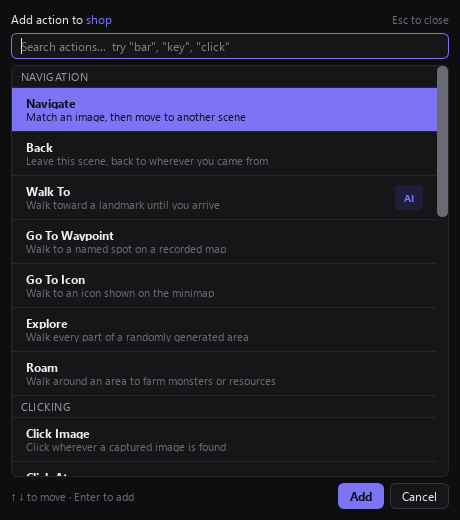
Make a scene for each screen or area of your game (main menu, inventory, a town) and capture what identifies it. Add the actions available there: buttons that lead to other scenes, things to click, read or check.
Describe a scenario
"Go to the shop and buy potions." "Go to the arena and collect the reward." Each step says which scene to go to and what to do there. No scripting, no coordinates to type.
Press Start
The bot works out the route to each scene by itself, runs your actions, repeats on your schedule, and recovers when something unexpected happens on the way.
Features
Everything it can do
Far more than click sequences, and all of it set up with the mouse.
Image and text recognition
Click images or text wherever they appear on screen, read numbers and words, and check health or resource bars.
Finds its own way
Navigate actions connect your scenes into a map. The bot routes from wherever it is, and backs out of menus it didn't expect.
Smart scheduling
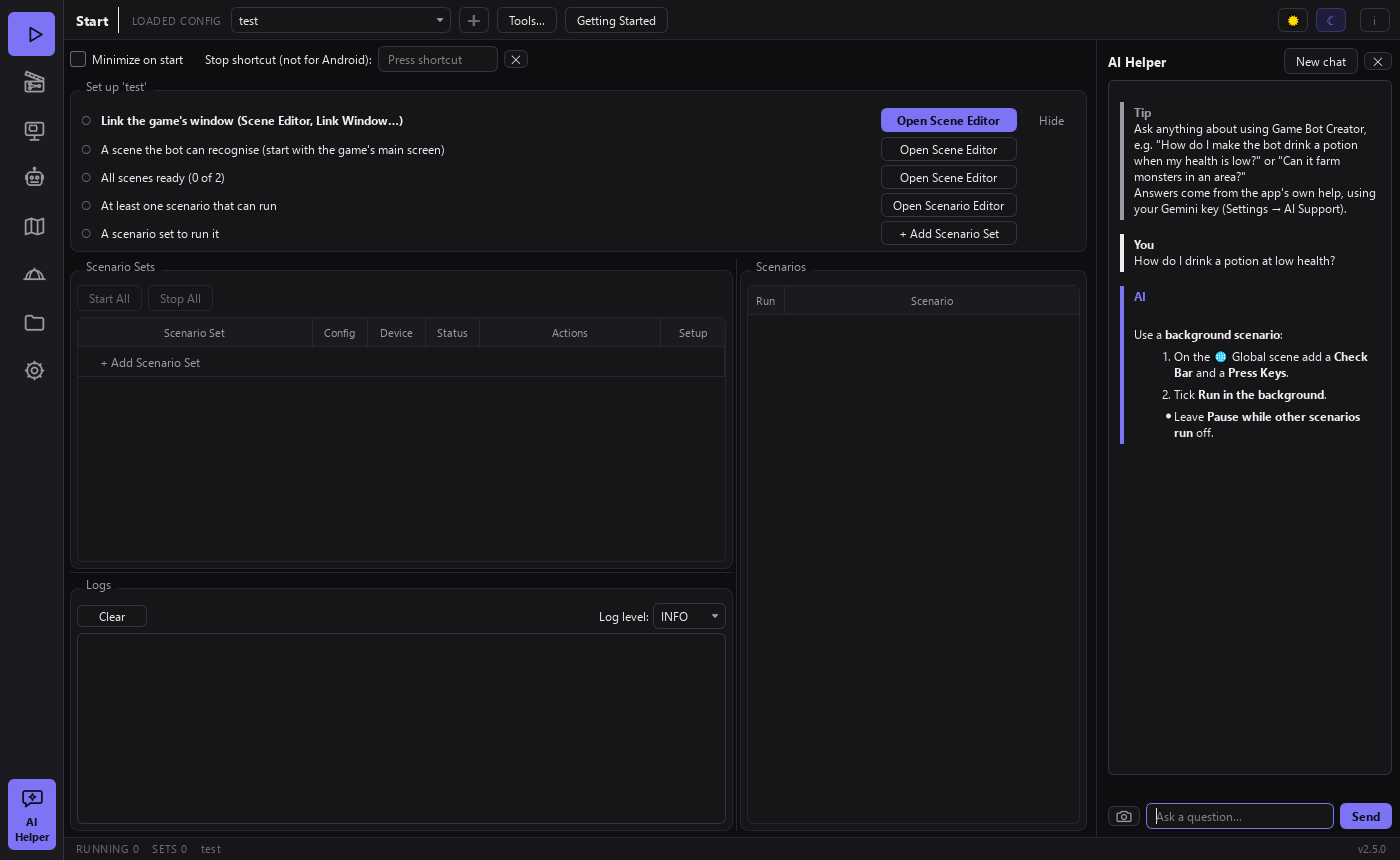
Cooldowns, run limits and prerequisites, so a scenario only runs when its conditions are met. Background scenarios handle things like drinking a potion at low health.
Real controls
Drag sliders to a value, pick radio options, scroll lists, hold keys and drag paths, not just single clicks.
Walks around with the minimap
Record a map once, then let the bot walk to waypoints or icons, explore an area, or roam it to farm resources.
Detect things that move
Train your own object-detection model in the app to find monsters, resources or players that don't look the same twice.
AI Helper and AI Generate
Ask the built-in AI Helper how to set something up, or let AI draft a scene or scenario from a screenshot for you to review.
Desktop and Android
Automate a Windows or Linux game window, or Android games in LDPlayer, MuMu, MEmu or BlueStacks, or on a phone over ADB. Run several at once.
Share configs
Browse configs other players have published for Android games, download one and run it, or share your own.
A closer look
Built to be set up with the mouse
Pricing
One price, yours to keep
No subscription. Updates included.
Game Bot Creator
$35
one-time payment, plus VAT where it applies
- License for 2 PCs
- Windows and Linux, Android emulators
- All updates included
- 7-day money-back guarantee
Secure checkout by Paddle: card, PayPal, iDEAL, Apple Pay, Google Pay. Your license key arrives by email.
Download
Get the app
The app asks for your license key on first start.
| System | Requirements |
|---|---|
| Windows | Windows 10 or 11, 64-bit |
| Linux | 64-bit (x86_64), Ubuntu 22.04, Debian 12, Fedora 36 or newer |
| Android | LDPlayer, MuMu, MEmu or BlueStacks on Windows, Waydroid on Linux, or a phone or tablet with USB/wireless debugging |
FAQ
Questions
Do I need to know how to program?
No. You capture images by dragging a box on your game, pick actions from a list, and arrange steps in the Scenario Editor. The Getting Started tutorial and the built-in AI Helper walk you through it.
What happens when something unexpected pops up?
The bot always checks which scene it's in. If it doesn't recognise the screen, it backs out step by step, and if it stays stuck it restarts the game by itself. It also waits out loading screens and animations before clicking.
Which games does it work with?
Any game you can see on screen: it works from screenshots and mouse, keyboard or touch input, and doesn't read or change the game's memory or files. Whether automation is allowed is up to each game's own rules, so check those before you run a bot.
Does it work with Android games?
Yes, in LDPlayer, MuMu, MEmu or BlueStacks on Windows, Waydroid on Linux, or on a real phone or tablet over ADB. You can run several emulator instances at the same time.
Do the AI features cost extra?
The AI features are optional. Today they use your own free Google AI Studio key, set up in Settings.
On how many PCs can I use it?
On 2 PCs at a time. You can move the license to another PC yourself from inside the app.
Can I get a refund?
Yes, within 7 days of purchase. See the refund policy.